Install Parfera
Sign up
Section titled “Sign up”Purchase a subscription here, each subscription allows one user to install and use Parfera on one computer running Windows or macOS. Each user is required to have a unique email address.
Note: Parfera for macOS runs on Apple silicon Macs (M1 or newer), it is not compatible with Intel Macs (released before 2020)
Download and install
Section titled “Download and install”After purchase, click on the download link for Windows or macOS. After downloading, open the file to install Parfera on your system.
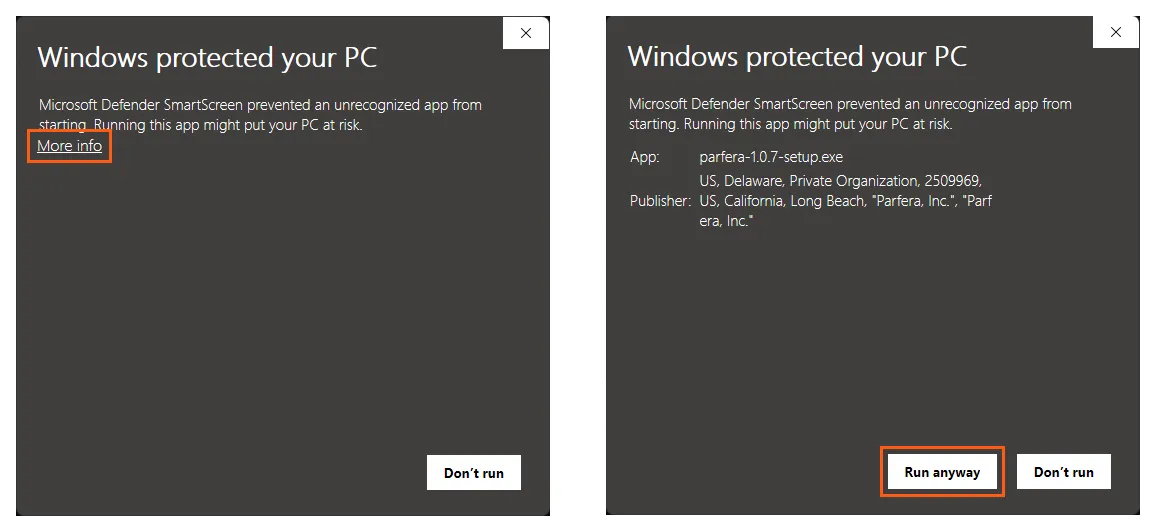
In some cases, Windows will ask the user to confirm running Parfera for the first time via a message “Windows protected your PC”. When this occurs, click the “More info” button and select “Run anyway”.